The model is the source
In the Hub you define which things your application knows – such as customer, order or invoice – which fields they have and how they relate. You describe, you do not program. From this description the build produces persistence, interfaces, checks and permissions.
The building blocks are few:
- Folders group models and later determine paths and role names.
- Enumerations hold fixed lists of values, such as a customer status.
- Models carry fields: simple values, enumeration fields and relationships.
- Abstract models bundle shared fields that several sub-models inherit – for example private and business customers under “customer”.
- Singletons exist exactly once – per installation, per tenant or per person, for example for settings.
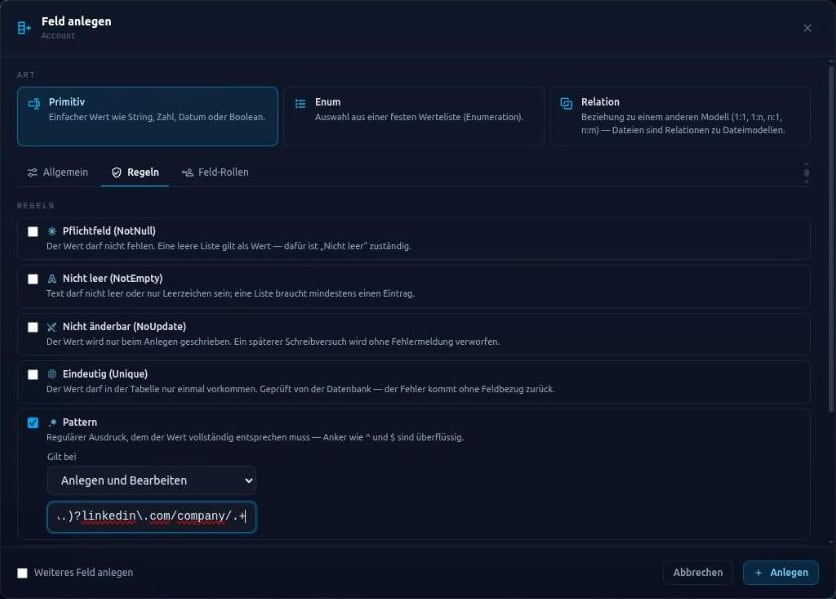
Rules on the field
You set the values a field may take by ticking boxes. Data Management checks these rules on every create, replace and update – whether the request comes from a form, an integration or a script.
- Required – always, or only on create or on update
- not empty, not updatable, unique
- patterns for text, minimum and maximum values for numbers
- long text and encrypted storage for text
Default values and collected messages
A default value fills a field on create when no value is sent. Data Management collects all rule violations and reports them at once, each with the field and the rule it broke. A form can mark every invalid input in one step – including in nested objects sent along.
The Hub already checks while you work on the model: invalid names, duplicate fields or a model that inherits from itself are rejected on save, with the reason shown at the field. Things that are allowed but usually a mistake get a warning sign – for example when an audited model points to one that is not audited.
Custom domain logic at fixed points
Nobody edits generated code by hand. Domain logic that the model cannot express is plugged in through hooks: before or after the database change, per action. A hook can assign a customer number, check a business rule or fill a required field before validation decides. If it rejects, the whole request is rolled back.
For individual values there are field hooks that can be attached to many fields across many models – for example to bring phone numbers into one consistent format.
What this means day to day
An explicit model can be reviewed by people and read unambiguously by tools.
- Business rules live in one place instead of being spread across forms and services.
- A model can be regenerated at any time without losing custom logic.
- People and AI work on the same structure instead of guessing it from code.