One trail for identity and rights
Who gave whom which role, and when? When was a tenant suspended? All areas report their events to a single audit trail: registrations, users, tenants, role grants and approvals for acting on behalf of a user. The acting person is taken from their sign-in. Reasons for suspending and closing are kept in the audit, not on the record.
Entries are only ever appended; there is no function that changes an entry afterwards. Which data someone changed is recorded alongside in the history of Data Management. The acting person and the point in time connect the two.
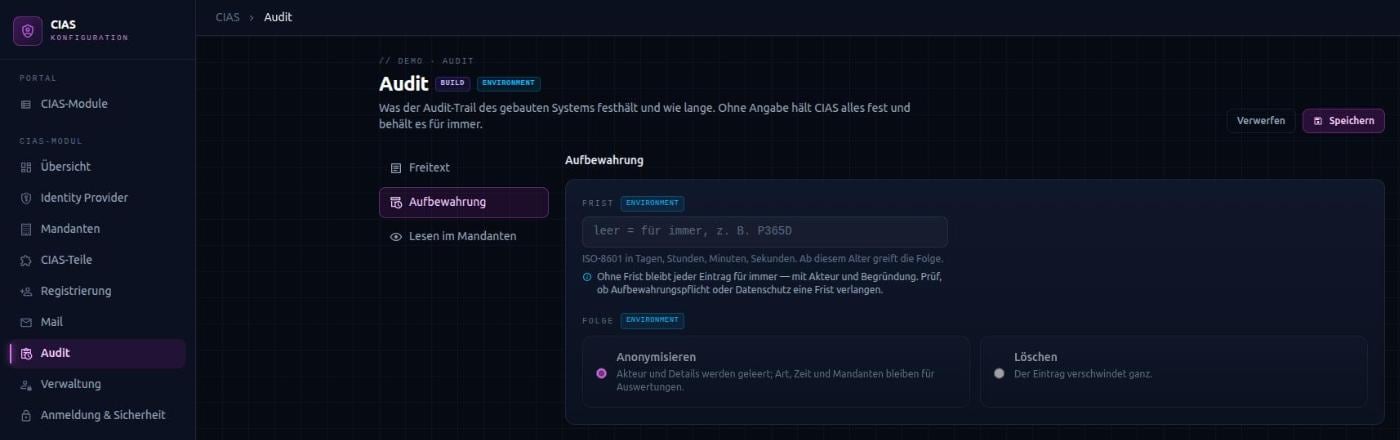
Retention on your terms
How long your system keeps a record of who did what is your decision. Identity & Access provides the settings for it without anticipating anything itself:
- Period – without one, every entry is kept. With a period, the chosen action applies once it has passed.
- Anonymise – the acting person and the details are cleared; type, time and tenants remain for analysis.
- Delete – the entry is removed entirely.
- Free text – administrators’ reasons can be recorded or deliberately left out.
Who reads the trail
Platform administrators read the entire trail. For tenants, you can define roles that read the entries of their own tenant. Entries can contain email addresses and freely written reasons – extracts should therefore be handled like other personal data.
Mails for fixed occasions
CIAS sends mails when something happens in the life of an account: address confirmation, invitation, joining a tenant, waiting for approval, rejection, welcome, a link for setting a password, and approvals for acting on behalf of a user. Every mail comes with a German and an English template. A password never appears in a mail – at most a link the person uses to set it themselves.
For every mail, CIAS searches from the specific to the general: first the tenant’s version, then the standard version, each in the person’s language. One customer’s template never ends up in another customer’s mail. Names, logos and colours can be inserted as data instead of maintaining a hundred copies of the same mail.
Who may change templates
Every mail leaves with your system’s sender address. That is why it is clearly governed who changes which wording: editors work on all templates. Tenant administrators only reword the mails of their own tenant, and only the kinds you released for this during assembly. Security-relevant mails are marked.