One flow, several variants
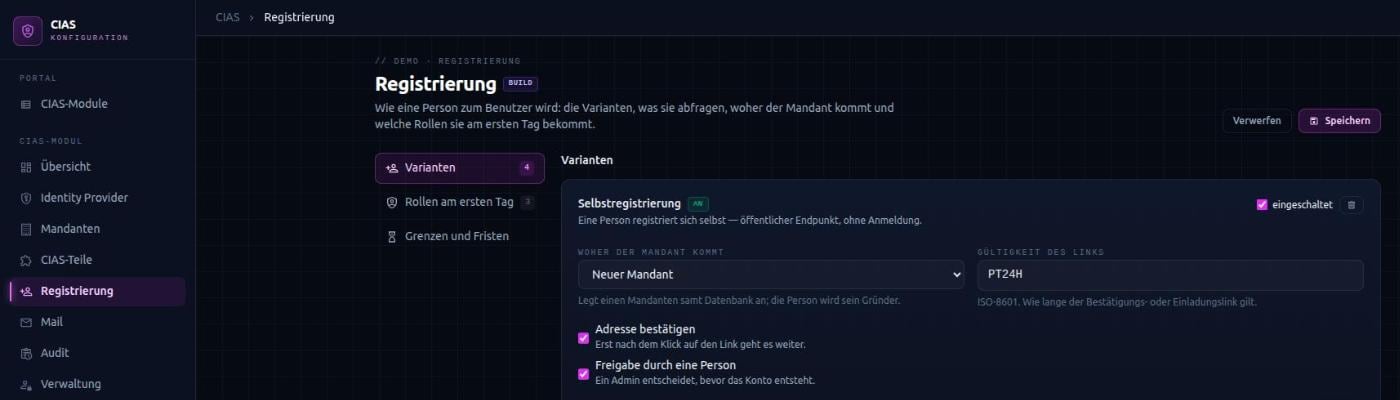
There is no separate program for each path. All variants share the same flow and differ in their policy: who may start it, which fields are required, where the tenant comes from, whether someone has to approve and how long the link stays valid.
- Self-registration – a person registers without signing in and typically founds a new tenant for their company.
- Invitation by tenant administrators – the tenant always comes from their own sign-in, never from the request. Nobody can invite into someone else’s tenant.
- Creation by platform administrators – for instance when support sets up access by hand.
- Redeeming the invitation – the invited person completes any open details and becomes a member.
Confirmation, approval, provisioning
A new account is created disabled. CIAS sends its own mail with a one-time link; only the click proves that the address belongs to the person. Where required, a platform administrator then approves the request – for example before a self-registration creates a new tenant.
Provisioning follows in a fixed order: determine initial roles, activate the account, create or assign the tenant, grant roles, send the welcome mail. If a step fails, the request stops in a recognisable state and can be retried. The person sets their password themselves at the identity provider – CIAS never accepts one.
The email address is the account
If a known address registers, no second account is created. Instead, the person receives an invitation to join; their password and account stay untouched. They only become a member once they redeem the link themselves. Neither a form nor an administrator can put a known person into a tenant without their involvement.
Protecting the public forms
Self-registration is reachable without signing in. That is why it reveals as little as possible and is throttled:
- The response never says whether an address already has an account. What the person needs to know is in the mail.
- Limits per address and per sender slow down mass sign-ups and protect mailboxes from floods of mail.
- Unconfirmed, unapproved and completed requests are discarded or removed after configurable periods.
- The form is built from the server’s field description, and the server validates against the same description.
Your own rules without touching the core
Admitting only addresses of certain companies, choosing the tenant by domain, asking for additional details: project-specific rules plug into defined extension points. They can change or reject a request. If you only want to react, for example with an entry in another system, you listen to the events that follow each step.